
Freelance Time Management: Earn More While Working Less (The System That Works)
The Freelancer’s Time Problem (And It’s Not What You Think)
Freelance Time Management. You think your problem is not having enough time. It’s not. Your problem is not protecting the time you have.
Freelancers work chaotic schedules. No boundaries between work and life. Clients can message anytime. You answer emails at midnight. You work weekends because you “need the money.” You have no consistent structure.
Then you wonder why you’re exhausted while earning less than you could be.
The paradox is simple: freelancers with strict time systems earn more and work less. Those without systems work more and earn less. It’s not about time. It’s about how you organize it.
This guide covers the exact time management system that protects your hours, eliminates distractions, and lets you focus on high-value work. You’ll learn the time-blocking framework, how to set boundaries that actually stick, and the daily rituals that keep you productive without burnout.
The Productivity Truth: You don’t need more time. You need to protect the time you have. A freelancer with 20 billable hours in a structured week earns more than one with 50 chaotic hours.
The Time Audit: Where Your Hours Actually Go
Most freelancers don’t know where their time goes. They think they’re working 40 hours but only 20 are billable. The other 20 disappear into emails, “quick” messages, context switching, and administrative work.
Before You Change Anything, Track Everything
Spend one full week tracking your time. Write down everything. Every email check. Every task switch. Every distraction. Every break. Don’t judge it—just document it.
What you’re looking for:
- Billable hours (work on client projects)
- Administrative hours (invoicing, email, scheduling)
- Distraction hours (social media, unrelated browsing)
- Planning/thinking hours (necessary but not billable)
- Break hours (rest, meals, exercise)
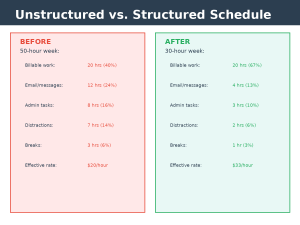
The Typical Breakdown (Before Optimization):
50-hour week:
Billable work: 20 hours (40%)
Email & communication: 12 hours (24%)
Admin tasks: 8 hours (16%)
Distractions: 7 hours (14%)
Breaks & transition: 3 hours (6%)
If you charge $50/hour, you’re generating $1,000 in revenue but working 50 hours. That’s $20/hour effective rate when you factor in overhead.
The Goal Breakdown (After Optimization):
30-hour week:
Billable work: 20 hours (67%)
Email & communication: 4 hours (13%)
Admin tasks: 3 hours (10%)
Distractions: 2 hours (6%) [realistic, not zero]
Breaks & transition: 1 hour (3%)
Same $1,000 in revenue, 30 hours of work. $33/hour effective rate. That’s a 65% improvement by organizing your time better, not working harder.
Also Read: Freelance Income Journey: From $0 to $5,000+/Month (The 6 Phases)
The Time-Blocking System: Your Weekly Blueprint
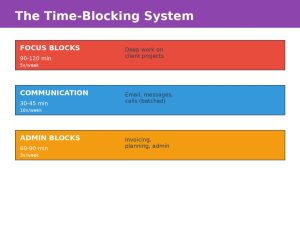
Time blocking is simple: divide your week into blocks of dedicated time for specific types of work. No context switching. No interruptions. One type of work per block.
The Three Types of Time Blocks
Block Type 1: Focus Blocks (Your Most Valuable Hours)
What happens: Deep work on client projects. Complete silence. No email checking. No distractions.
Duration: 90-120 minutes minimum. Your brain needs 15-20 minutes to enter deep focus, so shorter blocks waste that ramp-up time.
Frequency: 4-5 blocks per week (morning preferred, when your energy is highest)
Example schedule:
Monday-Friday: 8 AM – 9:30 AM (Focus Block)
Tuesday-Thursday: 10 AM – 11:30 AM (Focus Block)
= 5 blocks × 90 minutes = 7.5 hours weekly
During focus blocks:
- Phone in another room or off
- Email closed completely
- Slack/messenger disabled
- Calendar blocked (show as busy)
- Single project in focus
Block Type 2: Communication Blocks (Emails, Messages, Calls)
What happens: Handle all client communication in concentrated batches.
Duration: 30-45 minutes per block
Frequency: 2-3 blocks per day
Example schedule:
9:30 AM – 10 AM: Communication Block (answer everything)
12 PM – 12:30 PM: Communication Block (lunch break after)
4 PM – 4:30 PM: Communication Block (end-of-day wrap-up)
During communication blocks:
- Check all email, Slack, client platforms
- Answer everything (not brief, but comprehensive)
- Schedule calls/meetings if needed
- Respond to questions thoroughly so you don’t get follow-ups
Outside communication blocks: Silence. No checking email. No notifications. Complete radio silence until the next block.
Block Type 3: Administrative Blocks (Invoicing, Planning, Bookkeeping)
What happens: Handle non-billable work that keeps your business running.
Duration: 60-90 minutes per week (split into 1-2 blocks)
Frequency: 1-2 times per week
Example schedule:
Friday: 2 PM – 3:30 PM: Admin Block
(invoicing, follow-ups, planning next week)
Your Complete Weekly Time-Block Template
| Time | Monday | Tuesday | Wednesday | Thursday | Friday |
|---|---|---|---|---|---|
| 8-9:30 AM | FOCUS | FOCUS | FOCUS | FOCUS | FOCUS |
| 9:30-10 AM | COMM | COMM | COMM | COMM | COMM |
| 10-11:30 AM | BREAK | FOCUS | BREAK | FOCUS | BREAK |
| 12-12:30 PM | COMM | COMM | COMM | COMM | COMM |
| 12:30-2 PM | LUNCH/BREAK | LUNCH/BREAK | LUNCH/BREAK | LUNCH/BREAK | LUNCH/BREAK |
| 2-4 PM | FOCUS/ADMIN | OFF | FOCUS | OFF | ADMIN |
| 4-4:30 PM | COMM | OFF | COMM | OFF | OFF |
| 4:30 PM+ | OFF | OFF | OFF | OFF | OFF |
This schedule produces:
- 5 focus blocks = 7.5 billable hours (deep work)
- 10 communication slots = 5 hours (spread throughout day)
- 1 admin block = 1.5 hours (Friday wrap-up)
- 14 hours total = 67% billable rate on active work hours
Energy Matching: Working With Your Natural Rhythms
Not all hours are equal. Your brain has cycles. Some hours you’re sharp. Some you’re foggy. Forcing high-focus work during your low-energy hours tanks productivity.
Identify Your Energy Peaks
Track your energy for one week. Rate yourself 1-10 at key times:
- 6-7 AM: ? (morning person or zombie?)
- 9-10 AM: ? (after coffee kicks in)
- 12-1 PM: ? (after lunch)
- 3-4 PM: ? (afternoon slump?)
- 6-7 PM: ? (evening energy return?)
Most people show this pattern:
Peak Energy (8-9/10): 7-9 AM or 10-11 AM (after warming up)
Good Energy (6-7/10): 10 AM-12 PM, 2-3 PM
Low Energy (3-4/10): 1-2 PM (post-lunch dip), 4-5 PM (end-of-day crash)
Recovery Energy (5-6/10): 6-7 PM (if you take a break at 4 PM)
Match Work to Energy
Peak Energy Hours: Complex problem-solving, creative work, client strategy sessions, important decisions
Good Energy Hours: Routine tasks, documentation, moderate-complexity work, video calls
Low Energy Hours: Administrative work, email catch-up, planning, simple tasks
Example optimization:
- 7-9 AM (peak): Complex design or coding work
- 10-12 PM (good): Moderate work, calls, writing
- 1-2 PM (recovery after lunch): Admin tasks, invoicing
- 3-4 PM (low dip): Light work, email catch-up
- 5+ PM: Off work (or light tasks only)
Boundaries That Actually Stick (Not “Nice to Have”)
Most freelancers set boundaries and break them immediately. “I’ll only check email 3x daily” becomes checking every 2 minutes when a client messages.
The difference between boundaries that work and boundaries that fail is accountability and friction.
Boundary Type 1: Communication Boundaries
Boundary: “I check email and messages at 9:30 AM, 12 PM, and 4 PM only.”
How to make it stick:
- Remove email app from phone completely
- Log out of email outside blocks (require password to access)
- Turn off ALL notifications (desktop, phone, watch)
- Set Slack status to “Focusing until 9:30 AM”
- Tell your clients in advance: “I respond to messages at 9:30 AM, 12 PM, and 4 PM. For urgent issues, call [number]”
The Result: After 2-3 weeks, clients stop expecting instant responses. They adapt.
Boundary Type 2: Work Hour Boundaries
Boundary: “I work 8 AM – 4 PM. I don’t work after 4 PM or weekends.”
How to make it stick:
- Create a “work computer” session. At 4 PM, log out completely.
- Put your phone in another room after 4 PM
- Tell clients: “I’m available 8 AM-4 PM. For urgent issues outside hours, contact [method]”
- Block your calendar at 3:30 PM as “wrapping up”
- Create a ritual: close all work apps at 4 PM, then do something else (walk, exercise, hobby)
The Result: Real work-life balance. Clients get used to your hours. Your energy doesn’t deplete.
Boundary Type 3: Project Boundaries
Boundary: “No projects outside my niche” or “No projects under $X rate”
How to make it stick:
- Write it down: “I only take projects in [niche]”
- Practice saying no: Use template scripts
- Review weekly: Track which projects you took that broke your boundary
- Understand your why: Why does this boundary matter? (Time management, focus, rates, enjoyment)
“Thanks for reaching out. This isn’t in my wheelhouse, so I can’t do it justice. I’d recommend [alternative]. Thanks for thinking of me!”
Eliminating Distractions (The Real Approach, Not Fantasy)
You can’t eliminate all distractions. But you can eliminate the ones that waste the most time.
The Three Categories of Distractions
Category 1: Technology Distractions (Easiest to Fix)
Biggest culprits: Email notifications, Slack, social media, news sites
Real solutions:
- Email: Turn off notifications. Log out after each use. Don’t keep inbox open.
- Slack: Mute all channels except urgent. Turn off notifications during focus blocks.
- Social media: Delete apps from phone. Access only on computer when intentional. Use browser extensions to block.
- Phone: Put in another room during focus blocks. Use app limiters (Screen Time, Digital Wellbeing).
Category 2: Environmental Distractions (Second Easiest)
Biggest culprits: Noise, people interrupting, visual clutter, uncomfortable workspace
Real solutions:
- Noise: Noise-canceling headphones, white noise, work during quiet hours
- Interruptions: Door closed, “do not disturb” sign, work at different location (library, cafe)
- Clutter: Clear desk, minimal items in view, organized workspace
- Comfort: Good chair, proper desk height, adequate lighting
Category 3: Internal Distractions (Hardest But Most Impactful)
Biggest culprits: Procrastination, anxiety, decision fatigue, perfectionism
Real solutions:
- Procrastination: Break work into smallest possible first step. Start before you feel ready.
- Anxiety: Identify what you’re anxious about. Write it down. Often it’s smaller than you think.
- Decision fatigue: Make decisions the night before. Create templates and defaults.
- Perfectionism: Set a timer. “30 minutes on this, then move on.” Done is better than perfect.
Daily Rituals for Consistency
Rituals are the foundation of a time management system. They remove the need for willpower.
Morning Ritual (15 minutes)
Purpose: Set your day up for success before checking email
Morning Ritual:
7:45 AM: Coffee, water, no phone/email
7:50 AM: Review top 3 priorities for the day (from your plan)
8:00 AM: Clear desk, open only tools you need
8:05 AM: Start first focus block (do NOT check email first)
End-of-Day Ritual (10 minutes)
Purpose: Wrap up work cleanly, plan tomorrow, create closure
End-of-Day Ritual:
3:50 PM: Finish current task
3:55 PM: Write top 3 priorities for tomorrow (in your planner)
4:00 PM: Close all work apps, close all browser tabs, clear desk
4:05 PM: Leave workspace. Start non-work time.
Weekly Planning Ritual (30 minutes, Friday)
Purpose: Plan the week ahead, prevent surprises, stay organized
Weekly Planning:
Assess: How was this week? What worked? What didn’t?
Review: Check client project deadlines for next week
Plan: List top 5 priorities for next week
Schedule: Assign priorities to specific days
Prepare: Set up your calendar, blocks, and focus time for the week
The Biggest Time Wasters Freelancers Face (And How to Fix Each)
| Time Waster | Typical Hours Lost/Week | Root Cause | Fix |
|---|---|---|---|
| Email checking | 5-7 hours | Notifications, habit, anxiety | Turn off notifications, check 3x daily only |
| Unstructured breaks | 3-5 hours | No boundaries, context switching | Schedule breaks, stay off phone during work |
| Meetings/calls | 4-6 hours | Poor scheduling, no agenda | Time-block calls, require agendas, batch into specific days |
| Perfectionism | 2-4 hours | Fear of not being “good enough” | Set time limits, iterate instead of perfect |
| Administrative work | 3-5 hours | No system, scattered throughout week | Batch admin into 1-2 blocks, use templates |
| Social media | 2-4 hours | Habit, distraction, no accountability | Delete apps, use blockers, check only during breaks |
| Saying yes to wrong projects | 5-10 hours | No niche, no boundaries, money-focused | Define ideal projects, practice saying no, have templates |
| Rework/revisions | 3-6 hours | Unclear scope, no revision limits | Define scope upfront, limit revisions in contract |
Also Read: Upwork vs Fiverr vs Direct Clients: Which Platform Actually Makes You Money
Weekly Planning System (The Framework That Works)
Planning is how you prevent chaos. Without planning, you’re reactive. With planning, you’re proactive.
The Three-Level Planning System
Level 1: Quarterly Planning (90 minutes, once per quarter)
- What’s your goal for this quarter? (income, clients, projects)
- What’s required to hit that goal?
- What will you NOT do this quarter?
Level 2: Weekly Planning (30 minutes, Friday)
- Top 5 priorities for next week (ordered by importance)
- Client deliverables due next week
- Administrative tasks needed
- Assign priorities to specific days
Level 3: Daily Planning (5 minutes, morning)
- Today’s top 3 priorities (from weekly plan)
- What must be completed today?
- What blocks do I have scheduled?
30-Day Time Management Implementation
Week 1: Audit & Baseline
- Day 1-2: Track your time for 2 full days. Where does every hour go?
- Day 3: Identify your energy peaks (when are you sharpest?)
- Day 4: List your 3 biggest time wasters
- Day 5: Calculate your current billable percentage (billable hours ÷ total hours)
- Day 6-7: Identify one boundary you need to set
Week 2: Design Your System
- Day 8: Create your ideal time-block schedule (based on your energy)
- Day 9: Set up technology to support boundaries (turn off notifications, etc.)
- Day 10: Write down your daily rituals (morning and end-of-day)
- Day 11: Create your communication boundary statement
- Day 12: Set up your calendar with your time blocks
- Day 13-14: Test your system on a trial day or two
Week 3: Launch & Adjust
- Day 15: Officially start your new time-block system
- Day 16: Implement your daily rituals (morning and end-of-day)
- Day 17: Follow your communication boundaries strictly
- Day 18: Notice what’s working and what isn’t
- Day 19: Make first adjustments to your system
- Day 20: Batch your admin work (no scattered tasks)
- Day 21: Weekly planning ritual (assess Week 1 of new system)
Week 4: Solidify & Scale
- Day 22: Track your time again. Compare to Week 1.
- Day 23: Calculate new billable percentage (goal: +20% improvement)
- Day 24: Tighten one boundary (make it stricter if needed)
- Day 25: Optimize one time-block area (focus block duration, communication efficiency)
- Day 26: Share your system with one client or colleague
- Day 27-28: Plan next month’s focus areas
- Day 29-30: Document what’s working. Commit to keeping these habits.
30-Day Results to Expect: 20-30% improvement in billable hours. Reduced stress from better boundaries. Clear daily structure. System that works for your natural rhythms. Foundation for sustainable productivity.
The Long-Term Impact of Time Management
A well-managed schedule isn’t just about productivity. It’s about sustainability.
Freelancers without systems burn out. They work long chaotic hours, earn inconsistent income, and feel exhausted. Freelancers with systems work structured hours, earn consistent income, and feel in control.
The system doesn’t require you to work more. It requires you to work smarter. To protect your focus. To batch your communication. To say no to wrong work.
Three months from now, you could be working 25 hours a week and earning what you used to earn in 40. That’s not fantasy. That’s just time management.
Time management system not working for you? Email us at Sologikz@gmail.com with your schedule and biggest challenge—we help freelancers design systems that work for their specific situation.
About The Author
