
How to Set Up a Productive Remote Workspace on Any Budget
Remote Workspace on Any Budget
Whether you’re a freelancer starting from scratch or upgrading your home office setup, creating a productive workspace doesn’t require thousands of dollars. The right combination of ergonomics, organization, and smart purchasing decisions will have you working efficiently—regardless of your budget.
Why Your Remote Workspace Matters
As a freelancer working from home, your workspace is more than just a place to sit. It’s where productivity happens, where clients form first impressions during video calls, and where your mental clarity—or lack thereof—directly impacts your income.
Studies on remote workers consistently show that those with dedicated, organized workspaces report higher productivity levels, fewer distractions, and better work-life boundaries. More importantly for your business, a professional-looking background during video calls with clients builds confidence and trust.
The good news? You don’t need to spend a fortune to achieve this. With strategic planning and prioritization, you can build a functional, professional workspace at any price point.
The Essential Foundation: Budget Breakdown
Before diving into specific recommendations, let’s establish what you actually need. Remote workspace setup falls into three categories:
- Essential items (absolutely necessary for work)
- Comfort items (improve productivity and health)
- Nice-to-haves (enhance aesthetics and convenience)
By prioritizing essentials first, you can create a functional workspace immediately, then upgrade gradually as your budget allows.
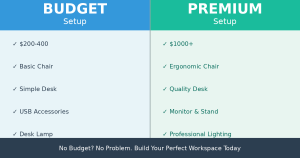
Tier 1: The Budget Setup ($200-400)
If you’re just starting out or working with limited funds, this tier gets you up and running without compromising on the basics.
Chair: $80-120
This is your most important investment. Cheap chairs lead to back pain, which directly reduces your work capacity. Look for:
- Adjustable height and lumbar support
- Used office chairs from local marketplaces (often $40-80)
- Budget gaming chairs (surprisingly decent for the price)
Pro tip: Check Facebook Marketplace, Craigslist, or local office furniture liquidation sales. People constantly upgrade their chairs and sell used ones in great condition at 50% off.
Desk: $60-100
- Simple wall-mounted desk or budget folding tables
- Used dining tables work perfectly
- DIY desk: plywood + inexpensive base = professional look at half the cost
Technology Essentials: $60-180
- Decent laptop stand ($15-30) — prevents neck strain
- Budget USB keyboard and mouse ($25-50)
- Basic desk lamp with adjustable brightness ($20-40)
Smart Buy: Invest more in items touching your body (chair, keyboard) than in visible decorations. Clients won’t see your chair, but they’ll see your posture during video calls.
Tier 2: The Comfortable Setup ($500-1000)
Once your business generates consistent income, this tier adds serious comfort and professional polish.
Chair: $200-300
Invest in a quality ergonomic office chair. This reduces fatigue, improves focus, and prevents long-term health issues. Consider:
- Steelcase or Herman Miller refurbished chairs
- Premium budget brands like Autonomous or Secretlab
- Ensure adjustable lumbar support, armrests, and tilt mechanism
Desk: $150-250
- Solid wood desk with proper cable management
- Electric standing desk (increasingly popular for health benefits)
- Minimum 48″ width to avoid clutter
Monitor Setup: $100-200
- 27″ monitor (24″ minimum) at eye level
- Adjustable monitor arm to position screen properly
- Reduces eye strain and improves posture
Lighting & Ambiance: $50-150
- Dimmable desk lamp (eliminates harsh shadows)
- Bias lighting behind monitor (reduces eye fatigue)
- Ring light for better video call appearance ($30-60)
Budget Hacks:
- Check Amazon Renewed or Best Buy Open Box for monitors and tech
- IKEA desk + standing desk converter ($100-150) = electric standing desk feel
- USB-powered LED strip ($12) provides professional background lighting
Tier 3: The Professional Premium Setup ($1000+)
For established freelancers who want the ultimate in comfort and professionalism:
Everything from Tier 2, plus:
- Dual monitors or ultrawide monitor for expanded workspace
- Premium mechanical keyboard ($100-300)
- Professional microphone and webcam for client calls
- Acoustic panels for video call quality and noise reduction
- High-end office furniture (Vari, Uplift, or Humanscale)
- Professional lighting setup with color temperature control
The Ergonomics That Actually Matter
Regardless of budget tier, these ergonomic principles apply to all setups:
Monitor Position
- Top of screen at eye level when sitting straight
- 20-24 inches away from your face
- Slightly below eye level if using multiple monitors
Keyboard & Mouse
- Elbows at 90-degree angle when typing
- Wrists neutral, not bent up or down
- Mouse at same height as keyboard
Chair Height
- Feet flat on ground, knees at 90 degrees
- Lower back supported with lumbar curve
- Chair height adjusted so forearms are parallel to desk
The 20-20-20 Rule: Every 20 minutes, look at something 20 feet away for 20 seconds. This prevents eye strain during long work sessions—it costs nothing and works instantly.
Organization: The Free Productivity Multiplier
A productive workspace isn’t always about expensive gear. Organization often matters more:
Cable Management
- Use cable clips or velcro straps ($5-10) to eliminate clutter
- Label cables so you know what’s what
- Route cables behind desk or through sleeves
Storage Solutions
- Floating shelves or simple shelving ($30-50)
- File organizer for documents
- Drawer dividers to keep supplies accessible
Desk Surface
- Keep only current project items on desk
- Use drawer space for everything else
- Clear desk = clear mind, every time
Making Your Workspace Client-Ready
Video calls are inevitable as a freelancer. Here’s how to make your background professional without major investment:
Background Wall
- Plain, neutral wall is perfectly professional (white, gray, soft blue)
- Add a floating shelf with 2-3 books or plants ($15-30)
- Avoid cluttered or busy backgrounds
Lighting for Video Calls
- Natural window light (best option, free)
- Desk lamp positioned in front of you, not behind
- Avoid harsh shadows on your face
Testing Your Setup
- Do a test video call with a friend
- Check audio quality (background noise, mic placement)
- Verify lighting shows your face clearly
Common Mistakes to Avoid
- Skimping on the chair: Your back will cost you more in healthcare than a good chair costs upfront
- Poor monitor placement: Neck pain reduces productivity for hours after work
- Inadequate lighting: Eye strain accumulates daily; invest in decent lighting
- No separation from living space: A dedicated workspace helps your brain shift into work mode
- Ignoring cable management: Clutter creates mental friction and looks unprofessional
Your 30-Day Setup Action Plan
- Week 1: Assess your current setup. Identify pain points (back pain, eye strain, distraction)
- Week 1-2: Secure your chair and desk. These are foundation items
- Week 2: Set up proper monitor height and keyboard/mouse positioning
- Week 2-3: Add lighting. Natural light + one good desk lamp minimum
- Week 3: Organize cables and create storage systems
- Week 4: Do a test video call and refine your background/lighting

Final Thoughts
Your remote workspace is an investment in your productivity, health, and professional image. You don’t need to spend thousands to get it right. Start with the essentials—a decent chair, a functional desk, and proper ergonomics—then build up from there as your freelance income grows.
The best workspace is one you’ll actually enjoy spending 6-8 hours in daily. Whether that’s a $300 setup or a $3000 setup matters far less than creating a dedicated space where you can do your best work, serve your clients professionally, and maintain your long-term health.
Start today with what you have. Upgrade tomorrow with what you earn.
About the author: This article is based on years of freelance work experience. The author has worked across various client types and workspace setups, from minimal home offices to premium studio spaces. This guide reflects practical lessons learned from setting up effective workspaces on different budgets.
About The Author
